vLLM Vs. Ollama Vs. Llama.cpp: Choosing An LLM Serving Framework For A Private Chatbot
You have a model you trust, a dataset you cannot ship to a cloud API, and a requirement that the chatbot feel responsive to a single user sitting at a...
You have a model you trust, a dataset you cannot ship to a cloud API, and a requirement that the chatbot feel responsive to a single user sitting at a terminal or a small team sharing a namespace. The model runs on hardware you already own - maybe a workstation with an NVIDIA GPU, maybe an Apple Silicon laptop, maybe a quiet x86 server in a closet.
You need a serving layer that takes a prompt, runs inference, and streams tokens back to a front-end. It must do this without turning the machine into a furnace or the maintenance into a second job. The three frameworks that keep surfacing in this conversation - vLLM, Ollama, and llama.cpp - each answer that need, but they answer it for different hardware, different traffic patterns, and different definitions of "production."
The choice is not about which one is best. It is about which constraint you are willing to live with. vLLM gives you the highest throughput on NVIDIA GPUs when multiple requests arrive at once. It does this at the cost of a heavier Python and CUDA stack that does nothing on a Mac. Ollama gives you a single-binary install, a dead-simple REST API, and a Modelfile packaging system that makes model distribution feel like a Dockerfile. It trades away the fine-grained scheduling control you get elsewhere.
llama.cpp runs on the CPU and on Apple Silicon with no GPU driver dance. It is fast enough at low batch sizes that a single user will not feel the difference. It will not saturate an A100 the way vLLM will. A private chatbot is usually a low-concurrency workload - one user, maybe three. The throughput numbers that dominate the vLLM benchmarks may not be the numbers that matter to you.
Latency at batch-size-1, memory footprint, startup time, and the friction of moving a model from a HuggingFace checkpoint to a running endpoint are what decide whether the thing gets used or gets abandoned.
This article walks through each framework as a practitioner would: what it is, how it manages memory and scheduling, what the API looks like, and how it handles the models you already have. It also covers where each framework breaks when you push it. It is not a benchmark bake-off - the dossier does not supply controlled measurements across identical hardware. It is a map of the trade-offs, grounded in the mechanisms each project documents.
By the end you will know which one fits the machine on your desk and the chatbot you are trying to ship.
How PagedAttention In vLLM Reduces Memory Waste
vLLM's headline contribution is PagedAttention, an algorithm that manages the key-value (KV) cache the way an operating system manages virtual memory. It uses fixed-size blocks, not one contiguous allocation per sequence. When a transformer generates tokens, it stores the keys and values for every previous token so it does not have to recompute them. A naive implementation reserves a maximum-length slot for every sequence the moment it arrives. If a sequence finishes early, that reserved memory sits idle.
If the model generates fewer tokens than the maximum, the waste is even larger. At batch sizes that a shared service sees - dozens or hundreds of concurrent requests - the waste can exceed half the KV cache budget. The vLLM blog post on PagedAttention claims up to 60% reduction in memory waste compared to the naive scheme. This figure comes from the original PagedAttention paper (arXiv:2309.06180). It matters when GPU memory is the binding constraint.
The mechanism works by allocating KV cache in blocks of a fixed number of tokens. The block size is configurable, typically 16 or 32. It maps logical KV cache positions to physical blocks through a block table, analogous to a page table. When a new request arrives, vLLM allocates only the blocks it needs for the tokens it has actually seen. When generation continues, it allocates new blocks on demand. When a sequence ends, the blocks are freed and immediately available to another request.
The block table also enables memory sharing. If multiple sequences share a common prompt prefix - a system message in a chatbot, a long context document - they can point to the same physical KV cache blocks for that prefix. This avoids duplication. This is not a theoretical edge case. A private chatbot with a long system prompt and several concurrent user sessions will hit it. The cost of PagedAttention is indirection. Every attention operation now goes through a block table lookup, which adds a small constant overhead.
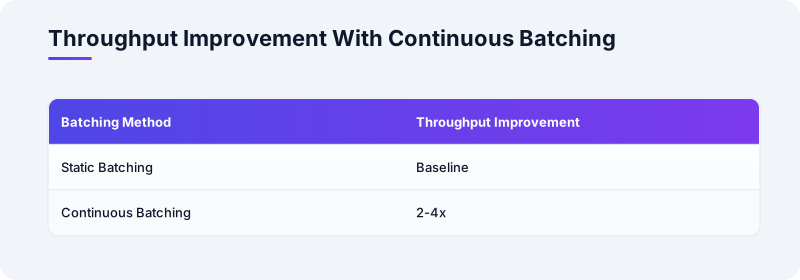
For a single-user chatbot running on a consumer GPU, that overhead is noise. For a service handling hundreds of requests, the memory savings translate directly into larger batch sizes and higher throughput. The vLLM documentation on continuous batching reports 2-4× throughput improvements over static batching. PagedAttention is a prerequisite for that gain. The memory waste reduction is not a free lunch. It is a lunch you want when GPU memory costs more than the compute to do the lookup.
What this means for a private chatbot is nuanced. If you are serving one user on a single GPU, you may never hit the memory pressure that makes PagedAttention necessary. The naive scheme wastes memory, but your GPU may have enough headroom. A 7B model in 4-bit quantization uses about 6 GB. If your GPU has 24 GB, you have room to spare. The moment you add a second concurrent user, a long document retrieval step, or a model that pushes the memory limit, the waste starts to matter.
PagedAttention is vLLM's answer to multi-tenancy. For a strictly single-user chatbot, it is a feature you benefit from only when the model is large relative to the GPU.
Continuous Batching And What It Means For A Single User
vLLM's continuous batching is the scheduling counterpart to PagedAttention. Traditional static batching waits for all sequences in a batch to finish generating. Then the next batch can start. If one sequence generates 500 tokens and another generates 10, the batch sits idle waiting for the longest sequence. Continuous batching lets the scheduler evict finished sequences and admit new ones at every iteration. An iteration is one forward pass of the model.
The vLLM documentation describes this as an iteration-level scheduler. It maintains a running set of sequences, adding requests that have arrived and removing those that have hit their stop token or length limit. It does this without waiting for a batch boundary. The throughput gain is real and documented. The vLLM blog post reports 2-4× throughput over static batching under load. But throughput is a multi-user metric. For a single-user private chatbot, the batch size is usually one - one prompt, one generation stream.
Continuous batching adds no latency benefit at batch-size-1. It adds a scheduler that is waiting for work that never arrives. The dossier notes that vLLM's throughput advantage diminishes for batch sizes below four requests. This is the regime a private chatbot lives in. If your chatbot will serve a team of five engineers who may all query it at once, continuous batching starts to matter. If it is you and a terminal, it does not.
The latency story is more subtle. vLLM's scheduler can preempt a long-running generation to admit a higher-priority request. In a single-user scenario, there is no other request to preempt for. The time-to-first-token (TTFT) is dominated by prompt processing. This is the forward pass over the input tokens. vLLM processes the prompt in one shot before streaming begins. For a short prompt of a few hundred tokens, TTFT on a GPU is fast enough that the framework overhead is not the dominant term.
For a long prompt - a document you want the chatbot to reason over - prompt processing time grows linearly with input length. vLLM's GPU acceleration helps here. llama.cpp on CPU will process that same prompt more slowly. For a 7B model in 4-bit quantization, the dossier's note on sub-second prompt processing on Apple Silicon suggests the gap may be smaller than the GPU-vs-CPU stereotype implies. The practical takeaway is that continuous batching is a feature you pay for in complexity and Python dependency weight.
You should pay for it only if you have the concurrency to use it.
A private chatbot serving one user does not have that concurrency. A private chatbot serving a small team behind a shared endpoint might. Even then, the concurrency is likely low enough that the simpler frameworks will keep up. Choose vLLM for its scheduler when the scheduler has work to do. Otherwise, treat it as overhead.
Llama.cpp And The CPU-First Path To A Responsive Chatbot
llama.cpp is a C++ inference engine that began as a project to run LLaMA models on a MacBook. It has since grown into one of the most portable LLM runtimes in existence. It compiles to a single binary with minimal dependencies. It runs on x86 and ARM. It accelerates inference on Apple Silicon through ARM NEON and the Apple Accelerate framework. It supports a wide range of quantization formats - from the original 4-bit "q4_0" to more recent K-quant methods.
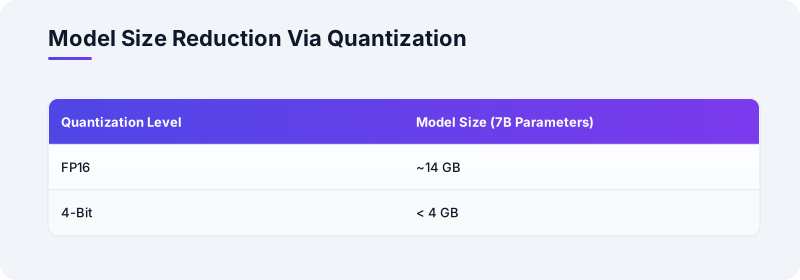
These formats shrink a 7B-parameter model from roughly 14 GB in FP16 to under 4 GB in 4-bit. The quality trade-off is small enough for many chatbot use cases. The llama.cpp GitHub README includes performance data showing sub-second prompt processing for 7B models on Apple M1 and M2 chips. This figure puts it within reach of a responsive single-user chatbot on a laptop. The engine's design is deliberately simple: load a GGUF-format model file, run a prompt, stream tokens.
There is no continuous batching, no PagedAttention, and no multi-GPU tensor parallelism. The KV cache is managed as a contiguous buffer. The scheduler handles one sequence at a time. For a single user, that is exactly the right design. There is no overhead for features you are not using. The code path is short enough that debugging a slow generation is a matter of checking the quantization level and the thread count. You do not need to trace a scheduler.
The C API and the bindings for Python, Go, and Rust mean you can embed llama.cpp in a larger application without pulling in a Python runtime or a CUDA toolkit.
The condition under which llama.cpp outperforms GPU-based serving for a private chatbot is straightforward. It happens when the GPU you have is not an NVIDIA GPU. It also happens when the NVIDIA GPU you have is too small for the model you want to run. An Apple M2 Max with 96 GB of unified memory can run a 70B model in 4-bit quantization entirely on the GPU via Metal. llama.cpp's Metal backend makes that work without a CUDA driver.
An x86 server with no GPU can run a 7B model on CPU cores.
For a single user, the speed may be perfectly acceptable. Ten to fifteen tokens per second is readable. A chatbot that types faster than a human can read is fast enough. The dossier does not supply controlled benchmarks across frameworks. The llama.cpp performance data for Apple Silicon is public and reproducible. The key variable is the quantization level, which trades model quality for speed and memory.
The limitation is concurrency. llama.cpp can serve multiple clients if you wrap it in a server process - the project includes a simple HTTP server. But it processes requests sequentially. Two users hitting it at once will queue. For a private chatbot that is you and maybe one colleague, that queue is invisible. For a team of ten, it becomes the bottleneck. At that point, vLLM's continuous batching starts to look worth the setup cost. llama.cpp's strength is that it makes the single-user case trivial.
Its weakness is that it does not grow beyond it without a different architecture.
Ollama's Packaging Model And The Modelfile Workflow
Ollama takes a different approach to the problem of getting a model running. It is not an inference engine in the sense that llama.cpp is. Under the hood, Ollama uses llama.cpp as its default backend for many models. It can also use other backends. What Ollama adds is a packaging and distribution layer. This layer includes a Modelfile that describes a model, its weights, its prompt template, its parameters, and its system message in one version-controlled file.
It also includes a registry that makes pulling a model as simple as ollama pull llama3.2.
The Ollama GitHub README and Modelfile documentation describe a workflow that feels deliberately like Docker. You write a Modelfile and run ollama create. You get a named model you can push, pull, and run with a single command. For a private chatbot, this packaging is a surprisingly large part of the operational burden. A model is not just weights. It is a tokenizer, a chat template, a stop-token list, and often a system prompt that sets its behavior. Getting all of those to match is a source of silent failures.
The model generates but uses the wrong chat format. The stop token is missing and the generation runs to max length. The system prompt is ignored because the template does not include it. Ollama's Modelfile makes these explicit and reproducible. The ollama show command lets you inspect what a model actually contains. That is a real operational win over downloading a GGUF file and writing a Python script to load it. You do not have to hope the chat template matches.
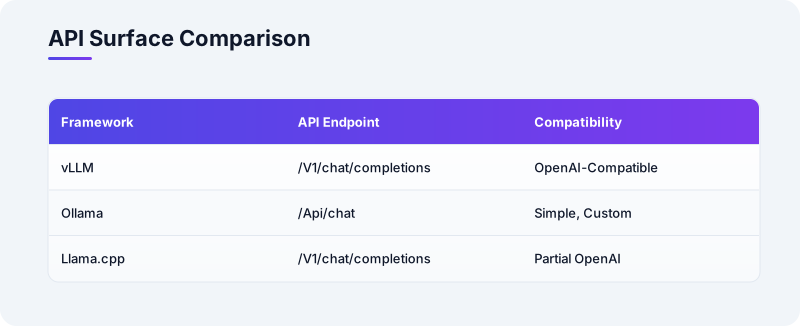
The REST API is the other half of the package. Ollama exposes a single /api/chat endpoint. It takes a list of messages and streams the response back as newline-delimited JSON. The API documentation is short enough to read in one sitting. The client libraries for Python and JavaScript are thin wrappers around an HTTP call. vLLM, by contrast, implements an OpenAI-compatible API - /v1/chat/completions. This API is more feature-rich but also more complex to integrate if you are not already using the OpenAI client libraries.
For a private chatbot front-end that is a simple HTML page with a text input, Ollama's API is the faster path to a working prototype.
For a front-end that already speaks the OpenAI API format, vLLM's compatibility is a drop-in advantage. The trade-off is control. Ollama abstracts the inference backend. You do not get direct access to the quantization parameters, the KV cache size, or the scheduling policy. You can set temperature and top-p in the Modelfile or the API call. You cannot, for example, pin a model to a specific GPU or adjust the block size the way you can in vLLM's configuration.
For most private chatbot deployments, that abstraction is a feature - less to configure, less to break.
For a deployment that needs to squeeze every token per second out of a constrained GPU, it is a limitation. The dossier does not provide a detailed comparison of Ollama's configuration surface against vLLM's. The pattern is consistent: Ollama optimizes for ease of use, vLLM for control, and llama.cpp for portability.
---
title: "Ollama Modelfile Workflow"
accTitle: "Ollama Modelfile Workflow"
accDescr: "Steps to create, push, pull, and run a model using Ollama's Modelfile."
---
flowchart TD
 n0["Write Modelfile"]
 n1["Ollama Create"]
 n2["Named Model"]
 n3["Push / Pull"]
 n4["Ollama Run"]
 n0 --> n1
 n1 --> n2
 n2 --> n3
 n3 --> n4
Quantization, Model Quality, And The Memory Budget
Quantization is the lever that makes a 7B-parameter model fit on a laptop. Each framework pulls it differently. llama.cpp is the most explicit. It defines a family of quantization formats - q4_0, q4_1, q5_0, q8_0, and the K-quant variants. Each format has a known bits-per-weight and a known quality trade-off. This trade-off is measured in perplexity on standard benchmarks. The llama.cpp GitHub README includes a table of these. The community has produced extensive measurements.
They show that a 4-bit K-quant model retains most of the quality of the FP16 original while using roughly one-quarter the memory.
For a private chatbot that answers questions about internal documentation, the quality difference between 4-bit and 8-bit is often invisible to the user. For a chatbot that writes code or does math, the difference may be noticeable. You should test with your own prompts. Ollama abstracts quantization behind the model tag. When you ollama pull llama3.2, you get a pre-quantized model - typically 4-bit. You do not choose the quantization level at pull time. You can create a Modelfile that points to a specific GGUF file with a known quantization.
This gives you the same control as llama.cpp, but you lose the one-command simplicity.
This is a fair trade. Most users should not have to understand quantization to run a chatbot. Ollama's default is sensible. The cost is that if the default quantization is wrong for your hardware, you have to step outside the happy path. It may be too large for an 8 GB MacBook. It may be too aggressive for a use case that needs high precision. vLLM supports quantization through its integration with the HuggingFace transformers ecosystem. The common methods are AWQ, GPTQ, and SqueezeLLM.
vLLM loads models in the format they were quantized in. It does not quantize on the fly; you bring a pre-quantized model.
The memory savings from quantization compound with the savings from PagedAttention. A 4-bit model uses less KV cache memory because the keys and values are themselves quantized. PagedAttention reduces the waste in that smaller budget. The vLLM documentation does not provide a single figure for the combined effect. The direction is clear: on a GPU with limited VRAM, quantization plus PagedAttention lets you run a larger model or serve more concurrent users than either technique alone.
The quality-speed-memory triangle is specific to your model and your prompts. The dossier does not supply a controlled comparison of quantization methods across the three frameworks. The responsible advice is to benchmark your own model on your own hardware with a representative set of prompts. Start with 4-bit - it is the default for Ollama and the most-tested in llama.cpp. Move up if the quality is insufficient. The memory savings are large enough that 4-bit is almost always the right starting point for a private chatbot.
Model Loading, Switching, And The Startup Experience
A private chatbot often needs to switch models. You might use a coding model during the day and a general-purpose model for evening questions. You might have a fine-tuned model for a specific project. How each framework handles model loading and unloading determines whether switching is a command you run or a ritual you dread. llama.cpp loads a model from a GGUF file on disk into memory when you start the process. The load time is a function of the file size and the storage speed.
A 4 GB model on an SSD loads in a few seconds.
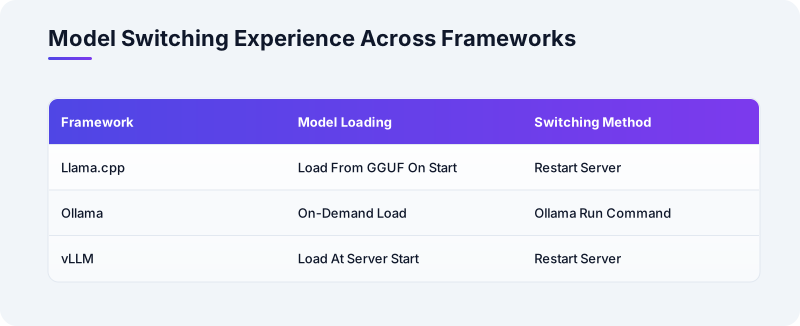
Unloading is a process exit. If you want to switch models, you stop the server and start it with a different model file. You wait for the load. For a single user, that is a few seconds of downtime. For a service, it is a restart. Ollama keeps a running server and loads models on demand. When you ollama run llama3.2, the server loads the model if it is not already in memory. It keeps it resident until you explicitly unload it or the server restarts.
The ollama ps command shows which models are loaded and how much memory they use.
Switching models is a matter of running a different ollama run command. The server handles the unload and load. This is the smoothest model-switching experience of the three frameworks. It matters for a private chatbot that is used interactively. You do not want to restart a server to try a different model. vLLM loads a model at server start and keeps it resident. The vLLM server can serve only one model at a time.
You can run multiple vLLM instances on different ports if you have the GPU memory to hold both models.
Switching models means stopping the server and starting it with a new model argument. On a large model, this can take tens of seconds to minutes as the weights move from disk to GPU. vLLM's design assumes a production service that serves one model for a long time. Model switching is not the use case it optimizes for. For a private chatbot that runs a single model all day, that is fine. For one that switches frequently, Ollama's on-demand loading is the more ergonomic choice.
The memory behavior during switching also differs. llama.cpp and Ollama release the old model's memory when they load the new one. vLLM's Python process may not return GPU memory to the OS promptly. This is due to CUDA memory allocator behavior. A restart is the cleanest way to switch. The dossier does not provide detailed memory-profiling data across frameworks. The operational pattern is well-known: vLLM is designed for stable, long-running deployments. Ollama is for interactive, exploratory use.
llama.cpp is for embedded or single-purpose processes where the model is a compile-time or startup-time constant.
API Design And Front-End Integration
The API is the surface your chatbot front-end actually touches. The three frameworks make different choices about what that surface looks like. vLLM implements the OpenAI /v1/chat/completions API. Any front-end that works with the OpenAI Python or JavaScript client works with vLLM with a base URL change. The API supports streaming, function calling, and the full OpenAI chat message format. For a front-end that is already built against the OpenAI API, vLLM is a drop-in replacement. Many open-source chatbot UIs are built this way.
The cost is that the API surface is large. You are implementing a subset of a commercial API. The parts you do not implement may confuse a client that expects them. Ollama's /api/chat endpoint is simpler. It takes a list of messages with role and content, a stream flag, and a handful of parameters like temperature and top-p. The response is newline-delimited JSON with one token per line when streaming. This is easy to parse in any language. It is easy to test with curl.
It is easy to wrap in a thin client library. The Ollama API documentation is short and the endpoint does one thing.
For a private chatbot front-end that you are building yourself, Ollama's API is less work to integrate than vLLM's. There is less surface to understand. This applies to a simple React component, a terminal UI, or a Slack bot. The trade-off is that if you later want to switch to a different backend or a cloud provider, you will need to rewrite the integration layer. vLLM's OpenAI compatibility makes that switch a configuration change.
llama.cpp's built-in HTTP server - llama-server - exposes an API that is broadly compatible with OpenAI's /v1/chat/completions as of recent versions.
The compatibility is not complete. It supports streaming and the basic chat format. Advanced parameters may be missing or behave differently. The server is a single binary, which makes deployment trivial. You copy the binary and the model file, run it, and you have an endpoint. For a private chatbot that runs on a machine with no Python, no CUDA toolkit, and no container runtime, llama.cpp's server is the path of least resistance. The choice of API is partly a choice about future flexibility.
If you think you may move the chatbot to a managed service later, vLLM's OpenAI compatibility preserves your front-end investment. If you are building a one-off tool that will live on your laptop, Ollama's simplicity wins. If you are embedding the chatbot in a larger application and want to call the inference engine through a C API rather than HTTP, llama.cpp is the only one of the three that offers that directly. The dossier does not provide a feature-by-feature API comparison.
The architectural difference is clear: vLLM aims for compatibility with an ecosystem standard, Ollama aims for minimalism, and llama.cpp aims for embeddability.
Hardware Requirements And The Deployment Matrix
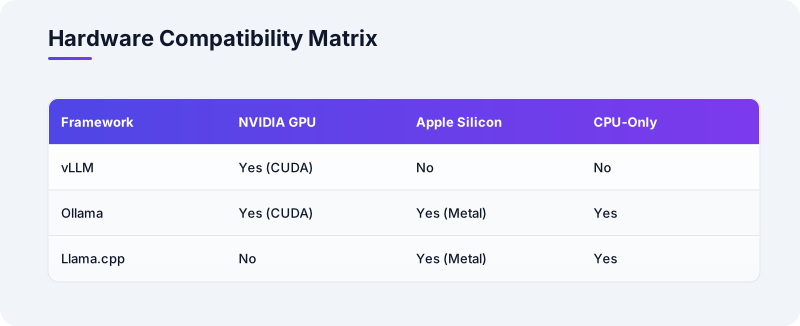
The hardware you have is the binding constraint. The frameworks divide the world into three camps. vLLM requires an NVIDIA GPU with CUDA 11.8 or later and Python 3.8 or later. It does not run on AMD GPUs, Apple Silicon, or CPU-only systems in any practical sense. There are experimental backends, but the documented, supported path is CUDA on NVIDIA. For a 7B-parameter model in FP16, vLLM needs roughly 14 GB of GPU memory for the weights. It needs additional memory for the KV cache.
In 4-bit, the weights drop to about 4 GB. This leaves headroom for a reasonable KV cache on an 8 GB GPU.
The vLLM system requirements are explicit about the CUDA and Python versions. Deviating from them is a source of opaque errors. Ollama runs on macOS (Apple Silicon), Linux, and Windows. It supports GPU acceleration via CUDA on NVIDIA and Metal on Apple Silicon. It defaults to CPU inference when no GPU is available. This makes it the most broadly compatible of the three. A 7B model in the default 4-bit quantization runs comfortably on a 16 GB MacBook. It leaves memory for the OS and other applications.
On a machine with an NVIDIA GPU, Ollama can use CUDA. It does not expose the fine-grained GPU memory management that vLLM does. You get GPU acceleration or you do not. The details are handled by the backend. For a private chatbot on a personal laptop, Ollama's broad compatibility is a decisive advantage. It just works on the hardware you already have. llama.cpp runs on essentially anything with a C++ compiler: x86, ARM, macOS, Linux, Windows, and even some embedded systems.
Its performance on Apple Silicon is well-documented. The llama.cpp GitHub README includes benchmarks showing sub-second prompt processing for 7B models on M1 and M2 chips. Its CPU-only path on x86 is fast enough for a single user at 4-bit quantization. The memory requirement is the model size plus the KV cache. A 4-bit 7B model uses about 4 GB. llama.cpp does not require a GPU at all. This makes it the only choice for a headless server with no GPU.
It is also the choice for an embedded deployment where a CUDA runtime is not an option.
The hardware matrix, without controlled benchmarks, looks roughly like this. If you have a recent NVIDIA GPU and expect concurrency, vLLM is the tool designed for that scenario. If you have a MacBook or a mixed fleet of machines and want the same workflow everywhere, Ollama is the most consistent experience. If you have no GPU, an older GPU, or a need to embed inference in a larger C++ or Go application, llama.cpp is the natural fit. The dossier's note on hardware requirements is qualitative, not quantitative.
The specific memory figures here are estimates based on the model size and quantization level. Measure on your own hardware before committing.
Wrapping Up With Something To Try
Pick the framework that matches the hardware you have right now - not the hardware you might buy - and get a 7B model running behind a simple chat endpoint this afternoon. If you are on a MacBook, install Ollama (brew install ollama), run ollama pull llama3.2, and send a curl to /api/chat with a single message. If you are on an NVIDIA GPU machine with CUDA already working, install vLLM (pip install vllm), launch the server with a model from HuggingFace, and point the OpenAI Python client at it.
If you are on a CPU-only Linux box, clone llama.cpp, build it, download a GGUF model, and start llama-server. Time the response to a prompt of exactly 100 tokens and write down the tokens-per-second. That number, on your hardware, with your model, is the only benchmark that matters for your chatbot. Then try the same model at 4-bit and 8-bit quantization if your framework allows it. See whether the quality difference is noticeable in the responses your chatbot actually gives.
The framework that gets you to that measurement fastest is the right one to start with.